
SERVER RULES:
1. Respect Others.
This is a civil domain -- If there is someone here you aren't on speaking terms with and you're inclined to make a scene, you're invited to leave. People here will forgive you your trespasses, as you will forgive those who have trespassed against you.
2. Administrators are LAW.
What the Administrators say is LAW. They act as a quasi-judicial body while the owners are away and unable to contend with any issues themselves. If you feel as if though you've been treated unfairly, you may message a server owner personally and submit an appeal.
3. Theft and Griefing is strictly prohibited.
3. Theft or destruction of Server/Player property of any kind is strictly prohibited, and any player observed in the act will be banned instantly. Any player accused with probable cause, will be temporarily banned pending investigation.
4. No Harassment.
This ties in directly with rule No. 1. Any unwelcome and/or inappropriate remarks or physical advances will be characterized as Player Harassment punishable up to and including permanent ban.
Understand that these rules go into effect immediately upon joining the server, and that you automatically agree to abide by these rules whether you’ve read them or not. These rules are also subject to change.
FREQUENTLY ASKED QUESTIONS:
Obtaining a copy of the Rules In-Game
You can obtain a copy of the Rule Book by speaking to NPC in the Server Administration Dpt. In the Administrative Building.
Writing and Sending Letters/Parcels
You don’t need anything to write or send letters. You only need to speak to a designated mailman to compose the message and send anything attached.
Please note that the letter will not send unless the recipient’s username is exact.
In order to receive mail and view your mailbox, you must L-click a designated “CustomNPCs” mailbox. Letters cannot be sent via the mailbox. Mail cannot be viewed from the mailman.
Banking and Checks
To store money in a wallet, open the Wallet GUI by pressing L-click. Place the wallet in the bottom row, Place the Wallet in the slot at the bottom right and click the "$$$" sign. All the money will be stored away.
If you wish to take money out, place the wallet in the bottom-right slot again and select the bills you wish -- $1, $5, $10 and so on.In order to use checks, you must first have a wallet with money, a blank check and a stamp.Once you obtain the blank check, take it to an anvil and name the check for the amount -- if it's for $10, write 10 -- if it's for $1000, write 1000
and so on.Once the check is named for the amount due, take it to the Blank Check Block, L-Click it and insert the Blank Check, the Stamp and the
Wallet you want to take money out of. Click the arrow, and the money will be taken out of the wallet and placed into the check.To cash checks, L-click your wallet and insert the check in the bottom row and the wallet in the bottom-right slot and click "$$$". The money
from the check will automatically deposit itself into the available balance in your wallet.You can also purchase Lottery Scratch-off Tickets at most financial institutions. In order to redeem them, you must visit the Scratch Ticket Shop. Even if you don't win, you can return them for paper.
Missing textures
The server's decorations come from the MiniaTuria and Cocricot Mods which require each of their Resource Packs and OptiFine to be enabled.If you go into: Options >> Resource PacksYou'll see the Resource Packs for both of them. If they're not enabled, you need to re-enable them with MiniaTuria on top and Cocricot on the bottom. Everything will return to normal after that.
Resolving a Player Dispute
You'll need to bring it to the attention of the Server Admins.
AlliieBug and MadameSeris
You can reach out to them in a couple of different ways, depending on the urgency of the matter.
You can write to them in a letter by using the Courier Service (CustomNPCs Mailman), or you can join the discord and write a message in the MineCraft channel (#Minecraft-txt-chat). The Discord link is found on the Title Page, when you first join in.
Filing a Player Report
Reporting a player is limited to suspicious and potentially dangerous activity such as a threat to DDoS the Server or harm a player out-of-game. We ask that you limit this option to a last resort.
Upon filing a report on a player, you will be asked for tangible proof -- irrefutable evidence that the player you're reporting is guilty of your accusation. If the search is inconclusive, the player is deemed innocent. If the player is found innocent and you report was false, then the punishment they would have received is now yours.
If this is all correct, then the next step is to contact the owners on Discord immediately.
The player will be suspended from the server temporarily, pending the investigation.
This action cannot be undone once submitted.
[ ItsSkyler#2344 ]
Housing, Settlements & Real Estate
You don’t need any special permission to begin building a house or settlement, we only ask that you build in a location that allows other structures their space to expand, unless you wish to conjoin with a neighboring nation. Such actions are the responsibility of the players, the server neither endorses or sanctions National Unity or Divorce unless otherwise specified.
In order to protect your land from theft, griefing and/or natural damage, We’ve implemented the FTB Utilities mod. In order to claim land, you need to open the E Menu GUI and first create a Team. In the upper right-hand set of buttons.
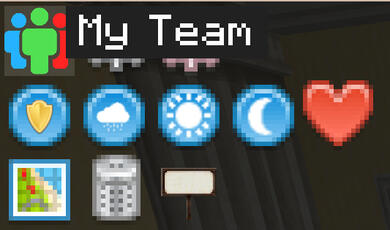
Once you’ve finished creating a team and designating all the preferred settings, you’ll need to claim the land you’re going to build on.
In order to claim land, Open the E Menu GUI once again and select Claimed Chunks.
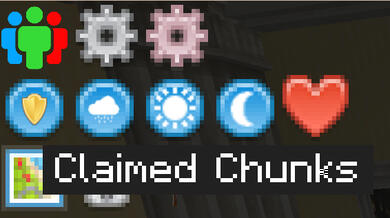
You can Claim Chunks by pressing L-Click and Unclaim Chunks by R-Clicking them.
More information can be found on the Mod’s website below.
It is the player’s responsibility to claim their own land. The server doesn’t offer reimbursement for liability or property damage of any kind.